


Affordable website design doesn’t mean settling for a site that looks unfinished or becomes expensive six months later. The goal is to spend money on the parts that affect customers while keeping the first version focused. Also worth reading: The Physical and Digital Threats Modern Businesses Can’t Afford to Ignore.
Small businesses now have several practical routes. You can use a hosted builder, build with WordPress, hire a freelancer, or work with a small agency. The right choice depends on your goals, technical comfort, content, and how much responsibility you want after launch.
| Route | Typical Cost Structure | Good Fit For | Main Advantage | Main Tradeoff |
| Hosted website builder | Monthly or annual subscription | Simple business sites and portfolios | Low upfront cost | Less control and portability |
| Self-hosted WordPress | Hosting plus optional themes or plugins | Blogs and content-focused businesses | Flexible ownership and expansion | More maintenance |
| Freelancer | Project fee plus possible maintenance | Businesses needing tailored work | Custom help without a full agency team | Quality and support vary |
| Small agency | Scoped project fee and optional retainer | Revenue-focused or more complex sites | Strategy and delivery handled together | Higher initial budget |
Direct answer: Affordable web projects work when you control scope instead of removing essentials. A hosted builder can fit a simple service site. WordPress suits content-heavy sites. A freelancer helps when you need tailored work. A small agency makes sense when strategy, content, SEO, or integrations must be coordinated. Compare total first-year and renewal costs before choosing.
What Affordable Website Design Should Include

A low price only matters if the finished site can do its job. A business site should give visitors a clear path from arriving on the page to taking the action you want.
At minimum, your project should cover:
- Mobile-friendly pages that work across common screen sizes
- Clear navigation and readable page layouts
- A contact, booking, signup, or purchase path
- Basic search-friendly page structure and metadata
- HTTPS and sensible security settings
- Analytics or another way to measure visitor activity
- Access to update your content after launch
Extras such as custom animation, complex calculators, bespoke integrations, or dozens of unique layouts can come later. Starting with fewer pages often reduces cost without weakening the customer experience.
Before choosing software, browse Techixia’s SaaS coverage to understand how subscription tools differ in pricing, features, and long-term commitments.
Four Budget Routes Compared
1. Use a hosted website builder
Hosted builders combine the editor, hosting, templates, and many routine technical tasks. They suit businesses that need a clear online presence without custom development.
This route gives you predictable setup and fewer technical decisions. The downside is that advanced changes may depend on the platform, its apps, and its pricing structure.
Current pricing shows why renewal costs matter. As of July 28, 2026, Hostinger’s U.S. website-builder page advertises a 48-month promotional rate starting at $2.99 per month, with a higher renewal rate of $10.99 per month. Prices and promotions can change.
A builder can be a sensible choice for a consultant, trades business, local service company, or professional portfolio. If you’re also comparing online platforms for different business needs, exploring eBay Alternative Sites can help you understand how various digital services and marketplaces fit different goals. Test the editor before committing to a long plan.
2. Build a lean WordPress site
Self-hosted WordPress gives you more control over hosting, themes, plugins, and content. That flexibility can be useful if publishing articles and expanding search traffic are part of your plan.
The software itself is only one part of the cost. You may pay for hosting, a premium theme, plugins, backups, security tools, or technical help.
WordPress works well when you want more ownership but don’t mind managing updates. A managed hosting plan can remove some technical work, although it adds another recurring cost.
3. Hire a freelancer
A freelancer can bridge the gap between doing everything yourself and paying for an agency team. You provide the business knowledge while the designer handles the build.
This route works well when your site needs a tailored visual identity, custom page layouts, or setup help. Ask who handles copy, images, mobile testing, revisions, analytics, and post-launch changes before accepting a quote.
Low headline prices can hide a narrow scope. Current provider pages show starter offers ranging from a few hundred dollars upward, but included pages and services differ sharply. Compare deliverables rather than assuming two similar prices represent the same project.
Use independent reviews while checking tools or providers. Techixia’s guide to PCMag competitors and technology review sites can help you find more sources for product research.
4. Work with a small agency
A small agency costs more than a DIY setup in most cases, but the comparison changes if you need several skills at once.
An agency may coordinate design, development, copy, analytics, search setup, and project management. That can reduce the amount of work you must organize yourself.
This route is more suitable when the website supports lead generation, paid advertising, online sales, or other revenue-critical activity. For online stores, compare platform charges and transaction requirements alongside the build fee.
Shopify’s U.S. pricing page currently lists Basic at $29 per month when billed yearly or $39 when paid monthly. That subscription is separate from design work and other business costs.
If ecommerce is central to the project, Techixia’s ecommerce coverage provides a useful starting point for related tools and technology.
The Hidden Costs Behind a Cheap Website
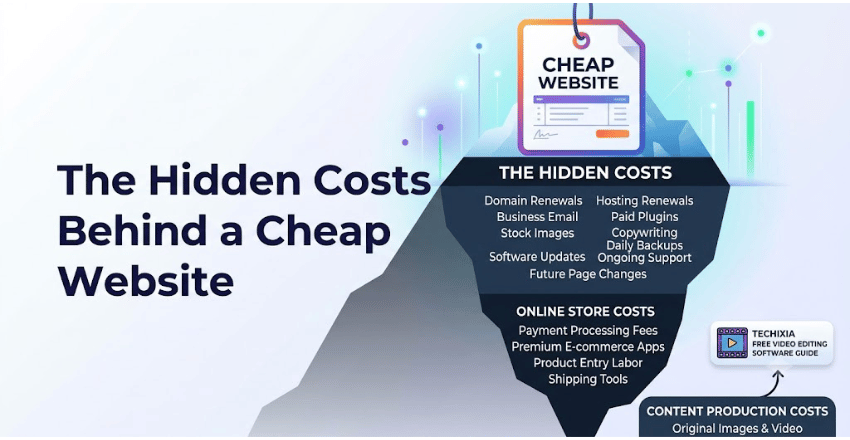
The cheapest quote can become expensive if important items sit outside the proposal.
Check whether your expected cost includes the domain, hosting renewals, business email, paid plugins or apps, stock images, copywriting, updates, backups, support, and future page changes.
Online stores may also have payment-processing charges, premium apps, product-entry work, shipping tools, and other recurring expenses.
Content has a cost too. If you need original images or video, decide whether you’ll create them yourself or outsource them. Techixia’s free video editing software guide can help if you plan to produce site videos without adding another paid subscription.
A useful quote should tell you both the launch cost and the likely 12-month operating cost. For subscriptions, check the renewal price rather than comparing introductory offers alone.
How to Choose a Low-Cost Option Without Overpaying
- Define the job of the site. Decide whether its main purpose is generating calls, bookings, leads, sales, subscriptions, or trust.
- List the first pages you need. A focused five-page business site may be more useful than a larger site filled with thin pages.
- Separate essentials from later upgrades. Launch the functions customers need now. Add secondary features after you have evidence they matter.
- Get the scope in writing. Confirm pages, revisions, mobile work, content responsibilities, analytics, ownership, support, and ongoing fees.
- Compare total cost instead of launch price. Calculate the first year and, where possible, a second year. Include renewals and maintenance.
Ask one more question before signing: What happens if I want to leave?
You should understand who owns the domain, content, images, analytics accounts, and site files. Ask whether you can export or migrate the site if your needs change.
Our Recommendation by Budget and Business Type

For a simple service business with a limited budget, a hosted builder is often the practical starting point. Keep the pages focused and spend time on useful content, strong calls to action, and accurate business information.
For a publisher, blog, or content-led business, a lean WordPress setup can offer more room to grow. Budget for maintenance rather than treating launch as the final expense.
A freelancer makes sense if templates can’t deliver the visual identity or functions you need. The quality of the brief matters here. Clear requirements make quotes easier to compare.
Choose a small agency when the site directly affects revenue and several disciplines must work together. Paying more for a defined business outcome can be cheaper than rebuilding a weak project later.
No route wins for every business. Our recommendation is to buy the least complex option that satisfies your current customer needs and gives you a realistic path to grow.
Build the Smallest Site That Can Do the Job Well
Start with a one-page project brief before paying anyone. State the business goal, required pages, must-have functions, available content, preferred launch date, and budget. Then compare at least a few equivalent options. Make sure each quote covers the same scope and calculate recurring costs separately.
A smaller, well-planned site is often a better investment than a cheap project filled with pages or features your customers don’t need. Spend first on clarity, usability, ownership, and the actions that support your business. Add complexity when the business case for it becomes clear.
If you want to know about How to Make a Facebook Post Shareable then visit our Ecommerce category.
Frequently Asked Questions
There isn’t one standard price. A DIY builder may begin with a low monthly subscription, while freelancer and agency projects can cost hundreds or thousands of dollars. Scope matters more than the label. Compare page count, custom work, content, support, recurring fees, and ownership before judging a quote.
A small site can launch faster when the pages, copy, images, and decision makers are ready. Custom layouts, integrations, ecommerce features, missing content, and repeated revisions increase the schedule. Ask for project stages and dependencies instead of relying on a launch promise alone.
Basic technical setup may be included, but ongoing search work often isn’t. Confirm whether the project includes page titles, descriptions, crawlability, mobile checks, analytics, indexing setup, redirects, and content work. The word “SEO” on a proposal can mean different things.
Choose based on the total cost and the functions you need. A cheaper plan can be enough for a simple site. It becomes poor value if you later need paid apps, upgrades, custom work, or a difficult migration.
Not always. A small store with standard products may work well on a hosted ecommerce platform. More complicated catalogs, integrations, subscriptions, international requirements, or custom customer journeys can make professional help more valuable.