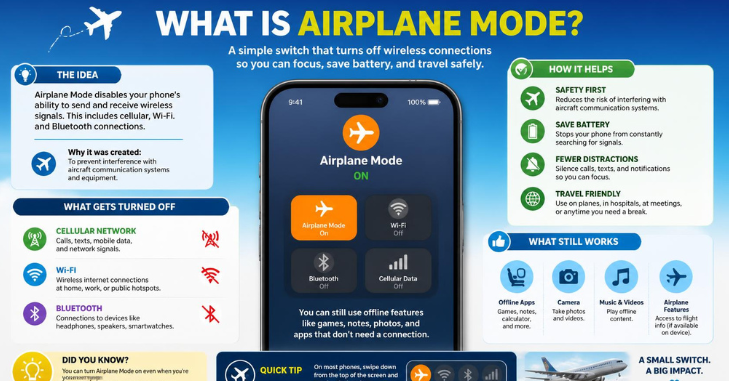
You have probably tapped the small airplane icon on your phone before a flight, but the setting does more than many people realize. What Is Airplane Mode? changes how your device communicates with cellular networks and other wireless connections while leaving most offline functions available. Understanding what it actually disables can help you use your phone correctly on a plane, conserve battery, avoid unwanted roaming, and troubleshoot connection problems.
Quick answer: Airplane mode is a device setting that turns off cellular connections and may also turn off or change WiFi, Bluetooth, and other wireless radios depending on the device. Your phone, tablet, or laptop can still perform offline tasks. You can usually turn WiFi and Bluetooth back on separately while airplane mode stays enabled.
Airplane Mode at a Glance
| Feature | What Usually Happens in Airplane Mode |
| Cellular calls | Disabled |
| Regular cellular texts | Disabled |
| Mobile data | Disabled |
| WWiFi | Often disabled initially, but can usually be turned back on |
| Bluetooth | May remain on or turn off depending on the device |
| Camera | Works |
| Alarm and clock | Work |
| Downloaded music and video | Work |
| Offline apps and games | Work |
| GPS/location | May continue working, but accuracy and app behavior can vary |
| Airplane Wi-Fi | Works when WiFi is re-enabled and the airline provides service |
What Is Airplane Mode?
What Is Airplane Mode? Sometimes called flight mode, it temporarily limits a device’s wireless transmissions. Its most important effect is disconnecting a phone or cellular-equipped tablet from its mobile carrier, preventing normal cellular calls, texts, and mobile-data connections. The rest of the device stays powered on, so you can keep using features that don’t depend on an active network.
The feature exists primarily so electronic devices can remain usable aboard aircraft without continuously communicating with terrestrial cellular networks. In the United States, the Federal Aviation Administration says you should use cell phones and portable electronic devices in airplane mode or with their cellular connection disabled while flying. The FAA also states that passengers may use an aircraft’s installed WiFi system when the airline permits it.
What Does Airplane Mode Actually Turn Off?
The exact behavior depends on your phone manufacturer, operating system, and settings, so airplane mode is not identical on every device. The most consistent change is that it turns off your cellular connection, which stops your phone from communicating normally with your carrier’s towers. WiFi, Bluetooth, and certain other radios may also be affected, although modern devices often let you reactivate some of them individually.
Cellular Calls, Texts, and Mobile Data
When you activate airplane mode, your phone disconnects from its normal cellular network. You generally cannot place traditional cellular calls, send standard carrier-based SMS messages, or browse the web through 4G or 5G mobile data until the cellular connection is restored. Apps that depend on the internet also stop updating unless you connect the device to WiFi.
This distinction matters because airplane mode doesn’t necessarily mean your phone must stay completely offline. If you turn WiFi back on, internet-based services such as messaging apps, email, websites, streaming services, and video calling can work normally when a connection is available. Some carrier features may also operate over WiFi depending on your device, carrier, account settings, and the network you are using.
WiFi
WiFi behavior: WiFi is a WiFi platform, but modern phones normally let you use WiFi while airplane mode remains active. Google says Pixel phones initially turn WiFi off when airplane mode is enabled, although users can turn WiFi back on and the device can remember that preference for future use. This is why you can connect to in-flight WiFi without restoring your phone’s cellular connection.
Apple follows a similar principle but handles the radios somewhat differently on current devices. Apple’s current support information says activating airplane mode on an iPhone turns off cellular and WiFi radios. At the same time, Bluetooth can remain available, and passengers can turn permitted wireless connections back on separately. That flexibility lets travelers use services such as an airline’s WiFi while keeping the cellular radio disabled.
If your home WiFi rather than airplane mode is causing connection problems, Techirya’s Best WiFi Router guide explains modern router choices and coverage considerations. Readers comparing newer wireless standards can also see Techirya’s WiFi 6E vs WiFi 7 guide for a WiFier look at current WiFi technology.
BlWiFioth
Bluetooth is another area where airplane-mode behavior has changed over time. Current iPhones can keep Bluetooth available when airplane mode is activated. At the same time, Google’s Pixel guidance says WiFi and Bluetooth may initially turn off but can be switched back on and remembered for later airplane-mode sessions. Samsung similarly says its Galaxy devices can disable network connections when airplane mode is activated while allowing WiFi and Bluetooth to be turned back on separately.
That means wireless earbuds, headphones, keyboards, watches, and other Bluetooth accessories can often be used during a flight when airline rules allow them. Still follow cabin crew instructions, because an airline can impose device-use requirements for a particular aircraft or phase of flight. Turning airplane mode on does not override the airline’s safety instructions.
What Still Works in Airplane Mode?
Airplane mode does not shut your phone down, erase information, or block access to files stored locally on the device. Most activities that do not require cellular service or another unavailable network can continue normally. This makes a phone useful even when you intentionally disconnect it from its carrier.
You can typically continue using the features below.
- The camera and photo gallery
- Alarm, clock, calculator, and calendar
- Notes and documents stored on the device
- Downloaded movies, podcasts, and music
- Offline games and apps
- E-books and downloaded reading material
- Previously downloaded maps
- Bluetooth accessories when Bluetooth is permitted and enabled
- WiFi internet when WiFi is manually reconnected
Location features require more nuance because phones can combine GPS satellites, Wi-Fi networks, mobile networks, and device sensors to estimate location. Android documentation notes that GPS and onboard sensors can determine location without relying on Google’s network-based Location Accuracy services. However, accuracy and speed may be reduced when wireless network information is unavailable. For travel, downloading maps before departure is therefore more reliable than assuming every navigation feature will behave normally in the air or without internet access.
Why Do U.S. Airlines Ask You to Use Airplane Mode?
U.S. aviation rules and guidance distinguish between using the device itself and allowing its cellular radio to operate in flight. The FAA says phones and other portable devices should have their cellular connection disabled or be placed in airplane mode, while approved onboard Wi-Fi can be used when the aircraft and airline support it. The goal is to control unauthorized radio transmissions while still allowing passengers to use compatible electronics.
Airplane mode is therefore not simply an outdated courtesy flight attendants request. It is the easiest built-in way for passengers to turn off the phone’s normal cellular connection without completely turning the device off. The safest practice in the United States is to enable airplane mode when instructed and follow the crew’s directions regarding Wi-Fi, Bluetooth, laptops, and other electronics.
Can You UseWi-Fi While Airplane Mode Is On?
Yes, you can normally turn Wi-Fi on after enabling airplane mode. Doing so leaves the cellular connection disabled while allowing the device to join an available wireless network, including supported in-flight networks. Both Apple and Google document the ability to use Wi-Fi separately while airplane mode remains enabled.
Once connected, most internet-based services can work as usual. You may be able to browse websites, send messages through internet-based apps, check email, stream content if the connection is fast enough, or use video and voice services where they are permitted. Actual capabilities depend on the airline’s Wi-Fi system, its service plan, connection quality, and any restrictions on particular types of traffic.
Can You Use Bluetooth in Airplane Mode?
In many cases, yes. Modern smartphones often allow Bluetooth to operate while airplane mode is active, either automatically or after you manually turn Bluetooth back on. Apple, Google, and Samsung all provide current guidance showing that Bluetooth behavior can be managed separately from the cellular connection on supported devices.
This is especially useful for travelers using wireless earbuds, headphones, watches, or keyboards. Pair your accessories before departure, if possible, so you won’t have to troubleshoot them after bboardiboarding followanfollow anytions from airline staff about when you can use accessories or electronic ddevicedevices
How to Turn On Airplane Mode on iPhone
On an iPhone, open Control Center and tap the airplane-shaped icon to enable airplane mode. You can also open the Settings app and use the Airplane Mode switch near the top of the screen. Once activated, the airplane symbol appears in the status area, and the cellular connection is disabled.
If the airline permits WiFi, return to Control Center or Settings and turn WiFi on without turning off airplane mode. You can also manage Bluetooth independently, which is useful if you want to use AirPods or another wireless accessory during the flight. Your phone may remember some wireless settings the next time you enable airplane mode.
How to Turn On Airplane Mode on Android
On most Android phones, swipe down from the top of the screen to open Quick Settings and tap the Airplane mode tile. On a Google Pixel, you can also go to Settings > Network & internet > Airplane mode and turn it on there. Menu wording can differ slightly on Samsung Galaxy and other Android devices, but the airplane icon is usually easy to identify.
After airplane mode is active, you can usually enable WiFi or Bluetooth separately when needed. Google says supported Pixel phones can remember whether you previously kept those wireless connections on, so their behavior may differ the next time you activate airplane mode. If you are unsure what your particular phone turns off, check its Quick Settings panel after turning airplane mode on.
Is Airplane Mode Useful When You Are Not Flying?
Airplane mode can be useful on the ground because turning off wireless connections reduces a device’s network activity. Apple specifically notes that airplane mode can help conserve battery, reduce roaming charges while traveling, and force a signal refresh when you are troubleshooting connectivity. Microsoft also recommends airplane mode as a possible battery-saving step when a Windows device doesn’t need wireless communications.
It can also help when your phone seems stuck on a weak or malfunctioning connection. Turning airplane mode on briefly, then switching it back off, forces the device to reconnect to available cellular and wireless networks rather than continuing to use its current connection state. This doesn’t fixn’t fix every network problem, but it is a quick first step before restarting the phone or resetting network settings.
Travelers can also use the feature as one layer of protection against accidental mobile-data use abroad. Keeping cellular service disabled prevents roaming connections while still allowing WWiFiwhen you deliberately want internet access. Still review your carrier’s international plan and roaming settings because airplane mode is a device control, not a substitute for understanding your account’s billing rules.
Airplane Mode vs. Do Not Disturb vs. Turning Your Phone Off
| Setting | Cellular Connection | Wi-Fi/Bluetooth | Offline Apps | Notifications |
| Airplane mode | Usually off | Can often be re-enabled | Work | Dependss on available internet |
| Do Not Disturb | Stays connected | Stay connected | Work | Usually silenced or filtered |
| Phone powered off | Off | Off | Unavailable | Not received until device restarts |
Airplane mode and Do Not Disturb solve different problems. Do Not Disturb controls interruptions while keeping your device connected, whereas airplane mode changes the device’s wireless connectivity. Turning the phone completely off goes further by shutting down the operating system and preventing you from using normal offline features.
What Airplane Mode Does Not Do
Airplane mode does not automatically make your device private, anonymous, or protected from every security risk. If you reconnect to WiFi, your device communicates over a network again, and apps with internet access can operate normally. Continue using normal security practices such as software updates, secure passwords, multifactor authentication, and trusted networks.
It also doesn’t delete messages or stop people from trying to contact you. Calls, texts, and app notifications that could not reach the device while it was disconnected may appear after connectivity returns, depending on the service involved. Airplane mode changes available communications; it does not remove accounts, conversations, contacts, or stored data.
The Bottom Line
What Is Airplane Mode? Airplane mode is best understood as a wireless-connectivity control rather than an off switch for your entire phone. It reliably turns off the cellular connection, while modern devices usually let you manage WiFi and Bluetoothand Bluetooth separately, so you can use downloaded content, accessories, and approved internet connections without restoring normal cellular service. On U.S. flights, enable it when the crew instructs you, and use onboard WWiFior Bluetooth only when the airline allows those connections.
Outside an airplane, the same setting can help conservehelp conserve battery power, avoid unwanted cellular connections while traveling, or quickly refresh a network connection. Remember that exact behavior differs across iPhone, Pixel, Galaxy, Windows, and other devices, especially for WiFi and Bluetooth. Checking which icons remain active after you enable airplane mode is the simplest way to see exactly what your device is doing.
Frequently Asked Questions
What happens when someone calls you while your phone is on airplane mode?
Your phone is normally disconnected from the cellular network, so a standard cellular call cannot reach it in the usual way. Depending on your carrier and voicemail setup, the caller may go to voicemail or may get a different network response. Internet-based calling can still work if you have manually eWiFid WWiFiand the app or service supports it.
Does airplane mode stop text messages?
Traditional cellular SMS messages normally cannot be sent or received while your cellular connection is disabled. Internet-based messaging services can work when you reconnect to WiFi because they use an internet connection instead of the phone’s normal mobile-data link. Messages that were waiting while you were disconnected may arrive when service returns.
Does airplane mode save battery?
It can reduce battery consumption because the device no longer continually maintains or searches for certain wireless connections. The benefit can be especially noticeable in places with poor cellular coverage, where a phone may otherwise spend more energy searching for a usable signal. Apple and Microsoft both identify airplane mode as a setting that can help reduce wireless-related battery use.
Does airplane mode turn off WWiFi?
It commonly turns WiFi off when activated, although behavior can vary by device and remembered settings. You can usually switch WWiFiback on manually without reactivating the cellular network. This is the normal way to use an airline’s onboard WiFWiFile keeping airplane mode enabled.
Does airplane mode turn off Bluetooth?
Not always. Current Apple devices can leave Bluetooth available, while some Android devices may initially disable it and then let you turn it back on separately. Your phone may also remember the Bluetooth preference you used during previous airplane-mode sessions.
Can you use airplane mode without being on an airplane?
Yes, you can use the feature anywhere. It can help temporarily disconnect your phone, reduce certain wireless battery usage, prevent ordinary cellular roaming, or refresh a troublesome network connection. The name describes its original travel purpose rather than a restriction on where you can activate it.