The best music production software for most producers is Ableton Live 12. It combines fast idea capture, detailed sound design, capable audio editing, and live performance tools. FL Studio is better suited to beatmakers, Logic Pro offers excellent value for Mac users, and REAPER is the budget-friendly choice for recording and mixing. Our related guide, best amd motherboard, goes further into this.
Your ideal digital audio workstation, or DAW, depends on your computer, genre, budget, and preferred workflow. This guide compares eight leading options and helps you narrow your choices before buying. You can also browse Techixia’s latest desktop and mobile app coverage for more software recommendations.
Quick Comparison of the Top DAWs
The prices below were checked on August 6, 2026. Promotions, taxes, and regional pricing may affect the final amount you pay.
| Rank | DAW | Best for | Platforms | Starting price | Main limitation |
| 1 | Ableton Live 12 | Electronic music and live sets | Windows, macOS | $99 | Full editions are expensive |
| 2 | FL Studio | Beatmaking, hip-hop, and EDM | Windows, macOS | $99 | Its workflow can feel unusual. |
| 3 | Logic Pro | Mac users seeking an all-in-one package | macOS | $199.99 | Apple hardware is required |
| 4 | REAPER | Affordable recording and mixing | Windows, macOS, Linux | $60 discounted license | Few bundled instruments |
| 5 | Cubase 15 | MIDI editing and composition | Windows, macOS | $99.99 | Advanced editions cost more. |
| 6 | Pro Tools | Professional studios and band recording | Windows, macOS | $99 per year | Subscription costs can add up. |
| 7 | Fender Studio Pro | Songwriters and guitarists | Windows, macOS | $199.99 list price | It has a smaller learning community than older rivals. |
| 8 | GarageBand | Mac beginners who want a free DAW | macOS, iOS | Free | Limited advanced editing and routing |
How We Chose the Best Music Production Software
We compared operating-system support, workflow, included instruments, audio-editing features, MIDI tools, upgrade policies, and current prices. We also considered how quickly each program helps its intended users finish a song.
Best Music Production Software: Current buying guides usually separate DAWs by use case rather than naming one universal winner. Ableton often leads for electronic production, FL Studio for beatmaking, Logic Pro for Mac users, Pro Tools for studios, and REAPER for value. The rankings also account for recent product changes. One example is the transition from Studio One to Fender Studio Pro, which launched as the next version of the same production platform.
For more comparisons involving computers, software, and connected devices, visit Techixia’s technology buying guides.
1. Ableton Live 12: Top Pick for Electronic Producers
Ableton Live 12 is our leading recommendation for electronic musicians, loop-based songwriters, and live performers. Its Session View lets you trigger clips and test arrangements without committing to a fixed timeline.
Suite: The traditional arrangement view remains available for recording, editing, automation, and final song construction. Live 12 Intro costs $99, Standard costs $349, and Suite costs $749. The Suite includes the widest selection of instruments, effects, and sounds.
- Pros: Fast experimentation, capable time-stretching, useful bundled devices, and strong performance features.
- Cons: The Standard and Suite editions are expensive. New users may need time to understand the two-view workflow.
Choose Ableton when improvisation and audio manipulation shape your creative process. It is less compelling when affordability is your main concern.
2. FL Studio: Top Choice for Beats and Hip-Hop
FL Studio makes it easy to build drums, melodies, and patterns before arranging them into a complete track. Its step sequencer and piano roll are especially useful for hip-hop, trap, EDM, and other programmed genres.
Prices begin at $99. Higher-priced editions add more instruments, effects, audio tools, and stem-separation features. Every edition includes Image-Line’s lifetime free-update policy.
- Pros: Excellent beatmaking workflow, a strong piano roll, broad plugin support, and free future updates.
- Cons: Recording bands can feel less direct than it does in timeline-focused programs. Projects may also become disorganized without careful mixer routing.
FL Studio is the safer starting point for producers who plan to draw notes, chop samples, and program drums.
3. Logic Pro: Strongest Value for Mac Users
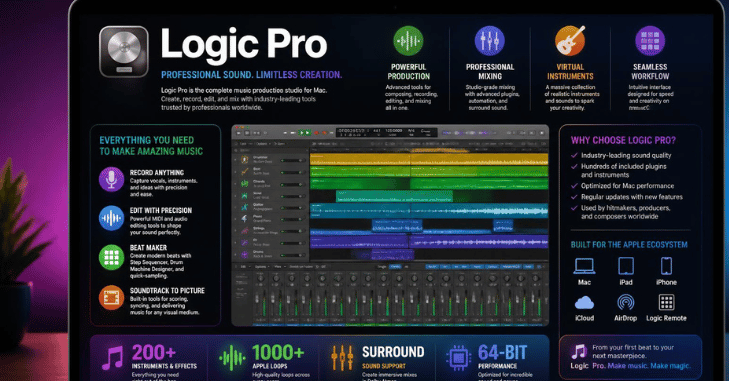
Logic Pro gives Mac owners instruments, effects, loops, recording tools, pitch correction, stem separation, and mastering features through a single purchase. Apple currently lists the Mac version at $199.99.
Its traditional timeline suits singers, instrumentalists, composers, and beatmakers. Live Loops also provides a clip-based workspace for developing arrangements.
- Pros: A large built-in library, a polished recording workflow, powerful MIDI features, and no recurring desktop subscription.
- Cons: Logic runs only on Mac. Moving sessions to Windows-based collaborators may require you to export audio stems.
Mac owners should try Logic before investing in another complete package. GarageBand projects can also be moved into Logic as your skills develop.
4. REAPER: Best Affordable Professional Option
REAPER costs $60 for eligible personal, educational, nonprofit, and lower-revenue commercial users. Its unrestricted evaluation period lasts 60 days. A commercial license costs $225.
The program is lightweight, customizable, and capable of complex routing. These qualities make it useful for multitrack recording, podcast editing, mixing, and computers with limited storage.
- Pros: Low price, small installation, flexible routing, scripting support, and regular updates.
- Cons: The default interface looks plain. You will probably need third-party virtual instruments and sound libraries.
REAPER offers considerable recording power for its price. Choose it when you value efficiency more than a large factory sound collection.
5. Cubase 15: Best for Composers and Detailed MIDI Work

Cubase has a long history in MIDI sequencing, arrangement, audio editing, and scoring. Cubase 15 is available in Elements, Artist, and Pro editions. Elements start at $99.99, Artist costs $329, and Pro costs $579.99. Steinberg also offers a 60-day Cubase 15 trial.
Pros: Detailed MIDI editing, mature composition tools, strong audio features, and several editions.
Cons: The interface contains many menus and panels. New producers may find it harder to learn than GarageBand or FL Studio.
Choose Cubase when your projects involve detailed MIDI programming, film scoring, large arrangements, or frequent tempo and chord changes.
6. Pro Tools: Best for Professional Studio Compatibility
Pro Tools remains common in commercial recording, editing, and post-production environments. The current Pro Tools lineup includes Artist, Studio, and Ultimate plans. The Artist starts at $99 per year.
Its editing, comping, routing, and hardware-integration features suit engineers who record vocals, bands, dialogue, or large sessions.
Pros: Familiarity across many studios, detailed audio editing, strong session organization, and professional hardware support.
Cons: Subscription pricing increases the long-term cost. Its MIDI workflow can feel slower than those of FL Studio or Cubase.
Learn Pro Tools when studio employment or session exchange matters. Home producers who work alone may receive better value elsewhere.
7. Fender Studio Pro: Best for Songwriters and Guitarists
Fender Studio Pro builds on the platform previously known as Studio One. It combines timeline recording, drag-and-drop editing, mixing, mastering, virtual instruments, and integrated Fender guitar and bass tones.
The perpetual license has a list price of $199.99 and was discounted to $139.99 at the time of publication. Monthly and annual Pro+ options are also available.
Pros: A balanced recording and composition workflow, useful guitar tools, integrated mastering, and flexible purchasing options.
Cons: The recent name change may confuse Studio One users. Certain additional services require an active Pro+ plan.
The program also includes newer assisted-composition and stem-processing tools. Techixia’s AI tools coverage explains similar technologies used across creative applications.
8. GarageBand: Best Free Choice for Apple Beginners
GarageBand gives Mac users a straightforward way to record instruments, program drums, use software instruments, and mix songs. Apple states that it supports projects containing up to 255 audio tracks.
The interface removes many advanced controls that could overwhelm a first-time producer. Projects can later be transferred to Logic Pro.
Pros: Free, easy to learn, capable of producing complete songs, and available across Apple devices.
Cons: There is no Windows version, and it offers fewer routing controls and less detailed editing than a full professional DAW.
Start with GarageBand when you already own a Mac. Pay for another program only after you understand which missing features you need.
A 30-Minute Test for Choosing Your DAW
Feature lists cannot tell you whether a workflow suits the way you work. Use this short test with the trial or free versions of your top two choices:
- Create an eight-bar drum-and-bass loop.
- Record or import one vocal or instrumental part.
- Add EQ, compression, reverb, and volume automation.
- Arrange a one-minute song and export it as a WAV file.
- Note which program requires fewer searches and menu changes.
Do not judge sound quality from the default presets alone. Any current DAW can record and export high-quality audio when you use the same settings.
Cloud storage and collaboration features may also affect your decision. Techixia’s SaaS coverage tracks online platforms that can support shared creative work.
Verdict: Which DAW Should You Choose?

Choose Ableton Live 12 when electronic production, looping, or live performance comes first. Choose FL Studio for programmed drums, melodies, hip-hop, and EDM. Pick Logic Pro when you use a Mac and want a complete package for a fixed price.
REAPER is the value winner for recording and mixing. Cubase suits detailed composition, while Pro Tools makes sense for commercial studio work. Guitarists and songwriters should consider Fender Studio Pro.
Mac beginners should start with GarageBand. It costs nothing and teaches the core recording skills used in larger programs. Download the trials for your top two options and complete the 30-minute test. Then use the winner for at least 90 days before considering another switch.
Conclusion
Choosing the best music production software depends on your experience, creative goals, and budget. Beginners may prefer intuitive DAWs with simple workflows, while experienced producers often need advanced recording, mixing, and mastering tools. The right software should match your operating system, support your preferred plugins, and provide the features you need without unnecessary complexity.
By comparing pricing, performance, and workflow, you can invest in a DAW that helps you create professional-quality music, improve your production skills, and grow with your projects over time. Whether you’re producing your first beat or your next studio album, the best music production software is the one that keeps your creativity flowing and delivers reliable results.
Frequently Asked Questions
GarageBand is the easiest starting point for Mac users because it is free and designed around a simplified recording workflow. FL Studio is a better beginner choice for beatmaking, while REAPER suits learners focused on affordable multitrack recording.
Yes. A free DAW can record, edit, mix, and export release-ready audio. Your recording technique, arrangement, sound selection, and mixing decisions have more impact than the program’s price.
Free choices include GarageBand, Waveform Free, LMMS, and other platform-specific tools.
Ableton is usually the stronger choice for live performance, audio warping, looping, and experimental arrangement. FL Studio is often easier to use for pattern-based beatmaking and detailed piano-roll programming.
Many commercial recording and post-production studios use Pro Tools. Logic Pro, Cubase, Ableton, REAPER, and other programs are also used in professional environments.
REAPER is a strong candidate because its installation is small and its system support is broad. Performance still depends on your plugin count, sample libraries, audio-buffer settings, and project size.