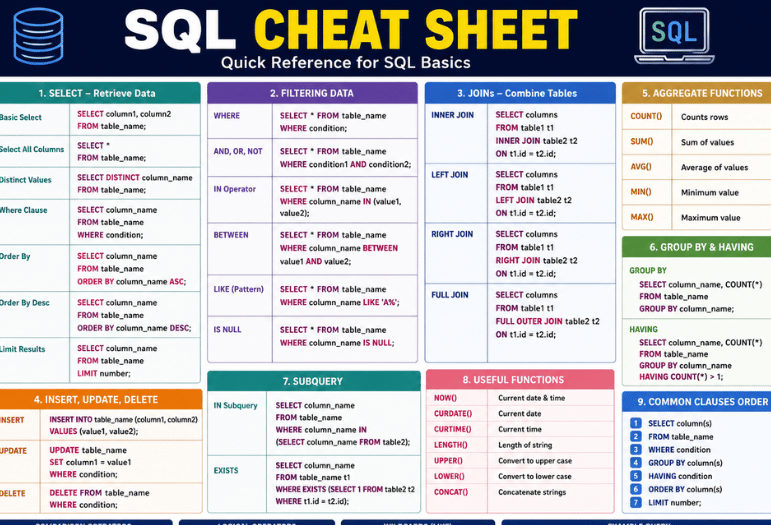
Most database work runs on a small core of commands. Learn roughly forty of them properly, and you can answer almost any question a table will give up. This SQL cheat sheet covers that core, with the traps that catch people out marked as you go.
Every query follows one order. You SELECT the columns, FROM a table, JOIN anything else you need, then WHERE to filter rows. After that comes GROUP BY to bucket them, HAVING to filter those buckets, then ORDER BY and LIMIT. Learn that sequence and the rest is detail.
The SQL cheat sheet at a glance
| Family | Key words | What it does |
| Reading data | SELECT, FROM, DISTINCT, AS | Pulls and names columns |
| Filtering | WHERE, AND, OR, NOT, IN, BETWEEN, LIKE | Narrows the rows |
| Combining | INNER, LEFT, RIGHT, FULL, CROSS JOIN, UNION | Brings tables together |
| Summarising | COUNT, SUM, AVG, MIN, MAX, GROUP BY, HAVING | Turns rows into totals |
| Ordering | ORDER BY, LIMIT, OFFSET | Sorts and trims output |
| Changing data | INSERT, UPDATE, DELETE, MERGE | Writes to tables |
| Structure | CREATE, ALTER, DROP, TRUNCATE | Builds and removes tables |
| Advanced | WITH, ROW_NUMBER, RANK, OVER | Named subqueries and rankings |
Key Takeaways: Where filters rows before grouping, and HAVING filters after. Null is not a value and never equals anything, including itself. And LIMIT is the single most portable-looking keyword that is not actually portable.
Reading and filtering

- SELECT name, price FROM products; pulls two columns
- SELECT DISTINCT country FROM customers; removes duplicates
- SELECT price * 0.8 AS sale_price FROM products; calculates and renames
- WHERE price > 100 AND stock > 0 combines conditions
- WHERE country IN beats a chain of ORs
- WHERE created BETWEEN ‘2026-01-01’ AND ‘2026-06-30’ covers a range
- WHERE name LIKE ‘Sm%’ matches a prefix, and ‘%th%’ matches anywhere
Two habits save hours. Write conditions against indexed columns where you can, and avoid wrapping a column in a function inside WHERE, since that usually stops the index being used.
Joins, in one table
| Join | Returns | Use it for |
| INNER JOIN | Only rows matching in both tables | Orders that definitely have a customer |
| LEFT JOIN | All left rows, matches where they exist | Customers including those with no orders |
| RIGHT JOIN | All right rows, matches where they exist | Rarely used; rewrite as a LEFT JOIN |
| FULL OUTER JOIN | Everything from both sides | Reconciling two partial lists |
| CROSS JOIN | Every combination of both | Building date or size grids |
| SELF JOIN | A table joined to itself | Staff and their managers |
The classic mistake is putting a condition on the right-hand table in WHERE after a LEFT JOIN. That quietly turns it into an inner join and drops the unmatched rows you were trying to keep. Put the condition in the ON clause instead.
Grouping and totals SQL cheat sheet
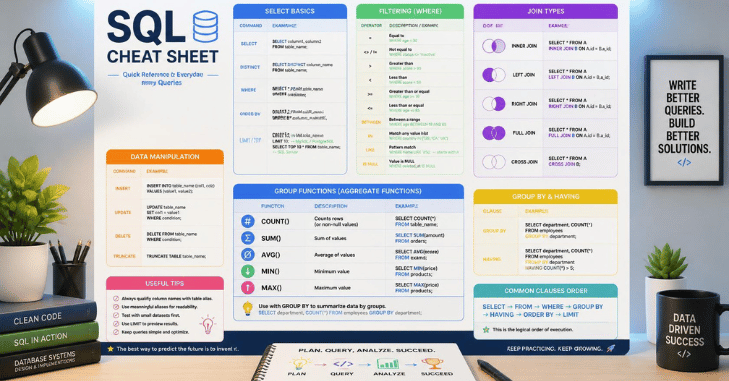
- COUNT(*) counts rows, COUNT(column) skips NULLs
- SUM(total), AVG(total), MIN and MAX do the obvious
- GROUP BY country buckets rows before the maths
- HAVING COUNT(*) > 5 filters the buckets afterwards
- Every non-aggregated column in SELECT must appear in GROUP BY
Remember the order of operations. WHERE runs first and removes rows, then grouping happens, then HAVING trims the groups. Putting an aggregate in WHERE returns an error in every major database.
NULL handling, where most bugs live
SQL cheat sheet: NULL means unknown, not zero and not an empty string. Comparing anything to it with an equals sign returns unknown rather than true, which is why WHERE column = NULL silently matches nothing.
- Use IS NULL and IS NOT NULL, never = NULL
- COALESCE(nickname, first_name, ‘friend’) returns the first non-null value
- NULLIF(a, b) returns NULL when the two match, handy for avoiding divide-by-zero
- Aggregates skip NULLs, so an average of five rows with two NULLs divides by three.
Writing and changing data
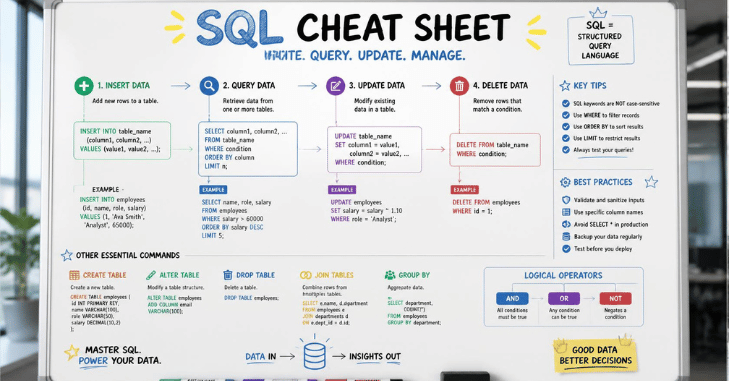
- INSERT INTO products (name, price) VALUES ;
- Update products Set price = 12.99 WHERE id = 4;
- DELETE FROM products WHERE stock = 0;
- TRUNCATE TABLE logs; empties a table far faster than DELETE
Run every UPDATE and DELETE as a SELECT first with the same WHERE clause. If the row count looks wrong, you have just saved yourself a restore from backup. Wrap anything irreversible in a transaction where your database supports one. Explore our SaaS category for more software reviews, comparisons, and expert guides.
Window functions worth knowing
These calculate across a set of rows without collapsing them into one, which is what separates a report from a summary.
- ROW_NUMBER() OVER (ORDER BY total DESC) numbers rows
- RANK() ties share a position and skip the next; DENSE_RANK() does not skip
- SUM(total) OVER (PARTITION BY customer_id) gives a per-customer total on every row
- LAG(total) OVER (ORDER BY date) reads the previous row, useful for growth calculations
Where the databases disagree
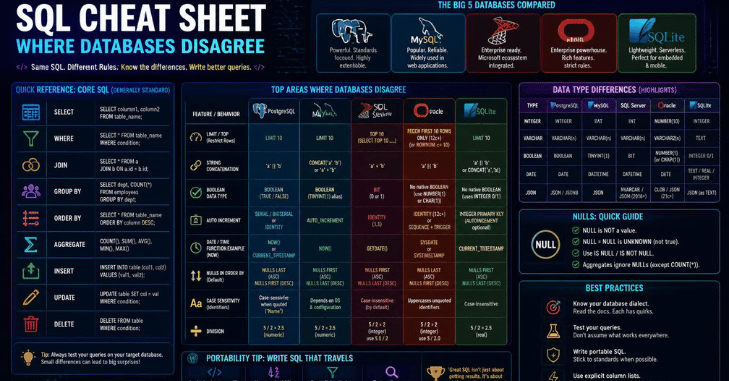
| Task | PostgreSQL and MySQL | SQL Server | Oracle |
| Limit rows | LIMIT 10 | SELECT TOP 10 | FETCH FIRST 10 ROWS ONLY |
| Substring | SUBSTRING() | SUBSTRING() | SUBSTR() |
| Join text | CONCAT() or || | CONCAT() or + | CONCAT() or || |
| Current time | NOW() | GETDATE() | SYSDATE |
| String quotes | Single only | Single, double for names | Single only |
Sorting of NULLs and case sensitivity both depend on collation settings rather than the standard, so test rather than assume when you move a query between systems.
Conclduion
Pick one table you already know and write five queries against it without looking anything up: a filter, a join, a group, a ranking and an update you never run. Recall beats reading, and the commands stick after roughly three sessions. SQL cheat sheet: If you spend long days at a keyboard, our guides to the right mouse for desk work and a reliable home router are worth a look. For wider reading, we also compare the tech review sites you should follow.
Apart from that, if you want to read more articles like this, XLOOKUP vs VLOOKUP, then visit our SaaS category
Frequently Asked Questions
For reading and reporting, yes. The commands above cover the large majority of everyday analyst work. Database design, indexing, and performance tuning are separate subjects worth learning next.
Where filters individual rows before grouping. Having filters the grouped results afterwards, which is why aggregate functions only work in Having.
A condition on the right-hand table sits in WHERE rather than ON. Move it into the ON clause and the unmatched rows return.
UNION ALL, unless you specifically need duplicates removed. Deduplication forces a sort and costs time on large results.
Mostly. SQLite lacks Right and Full Outer Join in older builds, and some string functions differ. The core SELECT syntax is identical.