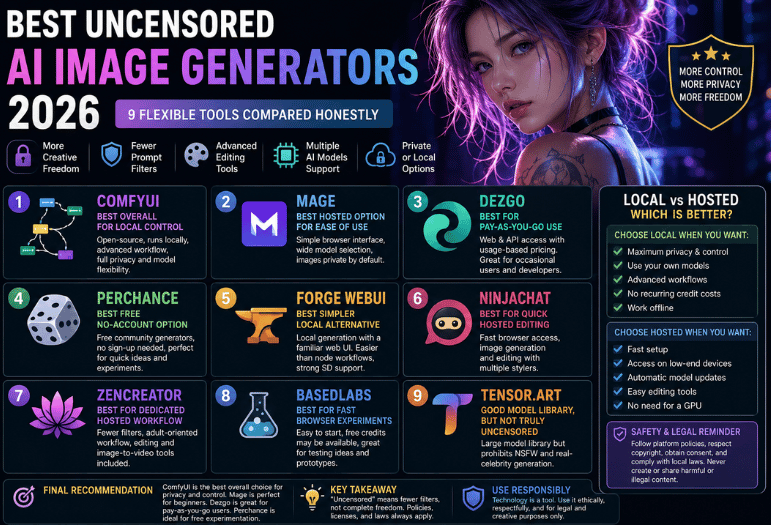
Finding the best uncensored AI image generators in 2026 has become harder than it sounds. Many services advertise “no restrictions,” yet still block certain prompts, limit model access, make creations public, or change their rules without warning.
For maximum control, ComfyUI running a permitted open model locally is our top pick. Mage is the easier browser-based choice. Dezgo works well for occasional pay-as-you-go generation, while Perchance is useful for free experiments that don’t require an account.
| Topic | Summary |
|---|---|
| Best Overall | ComfyUI – Best for local control, privacy, and advanced workflows. |
| Best Browser-Based Tool | Mage – Easy to use with a wide selection of AI models. |
| Best Pay-As-You-Go | Dezgo – Flexible pricing with web and API access. |
| Best Free Option | Perchance, no account is required for quick AI image generation. |
| Best Local Alternative | Forge WebUI – Simpler local interface for Stable Diffusion users. |
| Other Recommended Tools | NinjaChat, ZenCreator, BasedLabs, and Tensor. Art for different creative needs. |
| Key Selection Factors | Privacy, prompt flexibility, model support, pricing, editing tools, and commercial use. |
| Local vs Hosted | Local tools offer more privacy and control; hosted tools provide greater convenience and faster setup. |
| Safety Reminder | Always follow platform policies, model licenses, and copyright laws and obtain consent before creating or sharing images. |
| Final Verdict | ComfyUI is the top recommendation overall, Mage is best for beginners, Dezgo suits occasional users, and Perchance is ideal for free experimentation. |
What does an uncensored AI image generator do?
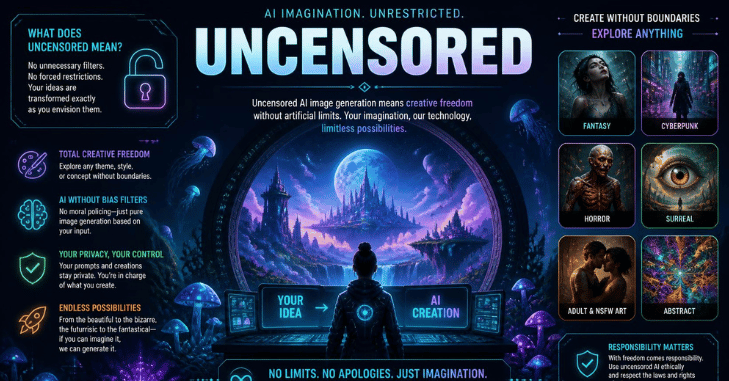
Best uncensored AI image generators of 2026 usually apply fewer prompt filters than mainstream services. It does not mean that every kind of content is legal, permitted, private, or safe to publish.
A service may allow fictional adult art but still prohibit the following:
- Sexual content involving minors
- Non-consensual intimate images
- Explicit depictions of real people
- Harassment, threats, or impersonation
- Copyright infringement
- Material that breaks local law
The distinction matters because marketing pages often use phrases such as “no filters” more broadly than their terms allow.
Tensor. Art is a useful example. Its current terms prohibit illegal generation, while a separate policy update says new NSFW and real-celebrity content is prohibited. That makes it a poor fit for users seeking broad adult-content support, despite its large model library.
The safest interpretation is fewer creative restrictions, not complete freedom from rules.
How Did We Choose the Best Uncensored AI Image Generators 2026?
This comparison focuses on practical control rather than dramatic marketing claims. Each option was assessed using these factors:
- Access to different image models
- Local or browser-based operation
- Prompt flexibility
- Image editing controls
- Privacy options
- Pricing clarity
- Ease of setup
- Current content policies
- Suitability for commercial workflows
We gave local software extra weight. A local interface can keep prompts and generated files on your own computer. It also removes many cloud-level keyword filters.
Local use does not cancel a model’s license. Stability AI, for example, applies an Acceptable Use Policy to its technology. Its Community License also has separate conditions for organizations exceeding $1 million in annual revenue.
1. ComfyUI: Best Overall for Local Control
ComfyUI is our top recommendation for users who want the most control over models, workflows, prompts, and stored files. It is an open-source, node-based image-generation interface that can run on your own computer. You connect model loading, prompts, samplers, image sizes, ControlNet tools, upscalers, and output nodes through a visual workflow.
Pros
- Runs locally on Windows, macOS, and Linux
- Supports many community and open-weight models
- Offers detailed workflow control
- Keeps local generations off a third-party platform
- Supports reusable and shareable workflows
- No recurring subscription is required for local use
Cons
- The node interface has a learning curve.
- Large models need substantial storage.
- Faster generation usually requires a capable GPU.
- You must check each model’s license separately.
ComfyUI suits experienced creators, developers, and privacy-conscious users. Its official documentation includes a guided first-generation tutorial for local installations.
Verdict: Pick ComfyUI when you want the strongest balance of privacy, model freedom, and advanced controls.
2. Mage: Best Hosted Option for Ease of Use

Mage provides image and video generation inside a browser. The company describes its platform as free, unlimited, and private by default, with public sharing left to the user.
Its model selection includes several Stable Diffusion, Flux, Chroma, Qwen, and image-editing options. Premium tiers add further models, faster modes, higher resolutions, or other paid capabilities.
Pros
- Simple browser interface
- Broad model selection
- Images are advertised as private by default.
- Free entry point
- Image and video features in one account
Cons
- Some models or faster modes require payment.
- Cloud generation is less private than a fully local setup.
- Rules can change as the service develops.
Mage’s terms prohibit privacy violations and other harmful conduct. Users should review those rules before creating or sharing sensitive work.
Verdict: Mage is the best browser choice for creators who want flexibility without configuring local software.
3. Dezgo: Best for Pay-As-You-Go Use
Dezgo offers web and API access to image and video models. It is a practical choice when you generate occasionally and don’t want another monthly subscription. The service publishes usage-based pricing. Its FAQ gives an example price of $0.0019 for a default text-to-image request, although the final cost changes with the model and settings.
Pros
- No large local installation
- Usage-based payment
- Web tools and API access
- Large selection of image models
- Useful for automation and application development
Cons
- Costs rise with volume or expensive settings.
- Browser use sends prompts to a cloud service.
- Model licenses may differ.
- The interface is more functional than polished.
Dezgo references the Open RAIL model license for relevant Stable Diffusion technology. Users remain responsible for permitted use.
Verdict: Dezgo works best for occasional generation, testing, and developer workflows.
4. Perchance: Best Free No-Account Option
Perchance hosts community-made generators, including several text-to-image pages. Many can be opened without registering, making the site convenient for quick ideas and low-stakes experiments.
Its strength is accessibility rather than professional production. Features, output quality, privacy behavior, and model choices may differ between generators.
Pros
- Many generators require no account.
- Free access
- Fast for rough concepts
- Large community ecosystem
- Works in a browser
Cons
- Inconsistent interfaces
- Limited professional editing controls
- Generator behavior can vary.
- Users should not assume sensitive prompts are private
Perchance’s terms grant the platform broad rights over content posted as a public contribution. That makes local software a better choice for confidential or commercially sensitive concepts.
Verdict: Use Perchance for free experimentation, not private client work.
5. Forge WebUI: Best Simpler Local Alternative
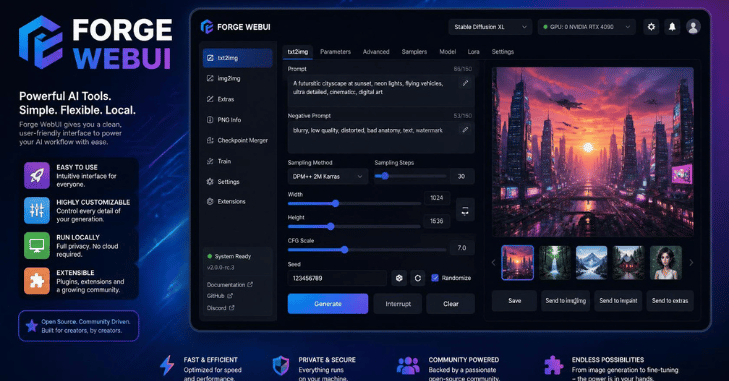
Forge WebUI is aimed at users who prefer a familiar Stable Diffusion web interface instead of ComfyUI’s node graph. It supports local model loading, prompt controls, extensions, image-to-image workflows, and common diffusion settings. Its local nature also means the hosting software does not impose a remote account’s prompt filters.
Pros
- Local generation
- Familiar web-style interface
- Strong Stable Diffusion support
- Easier for many beginners than node workflows
- No subscription for the software
Cons
- Installation can still be technical.
- Hardware affects speed
- Extensions may break after updates.
- Model licenses and safety remain your responsibility
Verdict: Choose Forge when you want local control but find node-based workflows distracting.
6. NinjaChat: Best for Quick Hosted Editing
NinjaChat markets an unrestricted image generator with text-to-image and image-editing features. Its page promotes multiple styles and resolutions through a hosted interface.
Pros
- Quick browser access
- Image generation and editing
- No local GPU setup
- Suitable for casual drafts
Cons
- Marketing claims should be checked against live terms.
- Hosted prompts pass through third-party systems.
- Long-term pricing and model availability may change.
- Less workflow control than local software
Verdict: NinjaChat is worth considering for fast drafts, but review its privacy and content rules before uploading personal images.
7. ZenCreator: Best for a Dedicated Hosted Workflow
ZenCreator openly markets its service around fewer filters and adult-oriented image creation. It also promotes editing, high-resolution output, and image-to-video tools.
Pros
- Built for users seeking fewer prompt blocks
- Hosted interface
- Editing and image-to-video features
- No local installation
Cons
- Performance claims come mainly from its own website.
- Subscription details may change.
- Hosted generation requires trust in the provider.
- “No restrictions” still does not permit unlawful material
Verdict: Consider ZenCreator when its specialist workflow matches your needs, but verify current billing and privacy terms first.
8. BasedLabs: Best for Fast Browser Experiments
BasedLabs appears in current comparison pages as a low-friction option offering free credits, browser access, and several generation tools.
Pros
- Easy to start
- Browser-based
- Free credits may be available.
- Useful for testing ideas
Cons
- Credit offers can change.
- Independent documentation is limited.
- Privacy depends on its current terms.
- Professional control may lag behind local tools. N M
Verdict: BasedLabs is useful for trials, but confirm its active policy before relying on it for recurring work.
9. Tensor. Art: Good Model Library, but Not Truly Uncensored

Tensor. Art remains a large platform for finding models, generating images, training resources, and trying creative workflows. It also states that it does not claim ownership over generated images.
Yet its current policy says new NSFW and real-celebrity generation or publication are prohibited.
Pros
- Large model-sharing community
- Browser generation
- Editing and training features
- Free access options
Cons
- Current NSFW restrictions
- Not suitable for users needing broad adult-content support
- Public community features may reduce privacy
- Rules can differ between generation and publishing
Verdict: Tensor. Art is useful for general AI art, but it should not be your first choice for unrestricted generation in 2026.
Local vs. Hosted Generation: Which Is Better?
Choose a local tool when you care most about the following:
- Keeping files on your computer
- Selecting your own models
- Building advanced workflows
- Avoiding recurring credit costs
- Working without an internet connection
Choose a hosted service when you care most about:
- Fast setup
- Mobile or low-powered computer access
- Automatic model updates
- Easy image editing
- Avoiding GPU purchases
The trade-off is simple. Local generation provides more control, while hosted tools provide more convenience.
Safety, Consent, and Legal Limits

Flexible software can still cause serious harm when used without consent. Never create sexualized images of minors. Do not make intimate or deceptive images of identifiable people without their permission. Avoid impersonation, harassment, fraud, and material designed to mislead viewers.
Rules concerning synthetic intimate imagery have tightened in many places. Public backlash and regulatory action around sexualized deepfakes also caused platforms to restrict previously permissive features during 2026.
You should also check:
- The platform’s current terms
- The model’s license
- Local laws
- Commercial-use permissions
- Whether generated files become public
- Whether prompts are stored or reused
For more practical software coverage, browse Techixia’s AI tools section and its wider technology guides.
Final Recommendation
The best uncensored AI image generators of 2026 are willing to learn its workflow system. It offers local privacy, extensive model support, and deep control. Mage is the strongest hosted alternative for most beginners. Dezgo is better for pay-as-you-go use or API access. Perchance works for free, casual experiments. We cover this in more depth in Coupon AI Tools.
Treat the word “uncensored” with care. Policies, licenses, laws, and hosting restrictions still apply. Review them again before paying for a plan or uploading sensitive source images.
Apart from that, if you want to learn about the article “PCMag Competitor,” then visit our Technology category.
Frequently Asked Questions
ComfyUI is the best option for local control and privacy. Mage is easier for browser-based creation. Dezgo suits pay-as-you-go users, while Perchance is a convenient free choice for casual experiments.
The software itself may be legal, but particular uses can break criminal, privacy, copyright, harassment, or intimate-image laws. Legality depends on the content, your location, consent, and how you distribute the result.
No. Hosted services still apply terms and technical blocks. Local models remove many platform filters, but licenses and laws continue to apply.
A local ComfyUI or Forge setup usually offers the strongest privacy because files can remain on your computer. Confirm that any connected extensions, API nodes, or cloud models are disabled when privacy is essential.
Perchance offers many free generators that can be used without an account. ComfyUI and Forge are also free, but you must install them and provide your own compatible hardware.
Sometimes. Commercial rights depend on the model license, platform terms, training assets, trademarks, recognizable people, and other elements in the output. Check every relevant license before publishing or selling the image.
Not always. Some platforms use the term to describe fewer stylistic prompt blocks. Their terms may still prohibit adult content, real-person depictions, public sharing, or other categories.