
The copyright symbol is ©, a circled capital C used in copyright notices. You can copy it directly from this page, type it with a keyboard shortcut, or insert it using an HTML character reference. More from us: Port 443.
Quick answer: Copy this character: ©. On Windows, you can enter it with Alt + 0169 using a numeric keypad. On Mac, use the Character Viewer to find and insert it. For websites, HTML supports © and numeric character references. A standard notice combines the sign, year, and copyright owner’s name. We cover this in more depth in print double sided.
| What you need | Value or method |
| Character | © |
| Unicode | U+00A9 |
| Windows | Alt + 0169 on the numeric keypad |
| Mac | Character Viewer |
| HTML named reference | © |
| HTML decimal reference | © |
| HTML hexadecimal reference | © |
| Basic notice format | © Year Copyright Owner |
| Example | © 2026 Techixia. All rights reserved. |
What Does the © Sign Mean?

The © mark identifies a copyright claim. It is commonly placed beside the year and the copyright owner’s name. Copyright itself protects qualifying original works of authorship. These can include written material, photographs, illustrations, software, music, videos, and other creative works. In the United States, protection generally begins when an original work is fixed in a tangible form.
Unicode identifies the character as U+00A9, the COPYRIGHT SIGN. That code gives software and devices a standard way to represent the same character.
The mark does not create copyright by itself. It is a notice that tells readers who holds the rights to a work and when it was published.
How to Copy and Paste the Copyright Symbol
If you need the copyright symbol only once, copying it is usually faster than remembering a keyboard shortcut.
Copy here: ©
Select the character, copy it, and then paste it into your document, website footer, social post, presentation, or another text field.
You can use standard copy-and-paste commands:
- Windows: Ctrl + C to copy and Ctrl + V to paste
- Mac: Command + C to copy and Command + V to paste
- Phones and tablets: Select the character, choose Copy, and then tap Paste
Copying is also a useful fallback when an app or compact keyboard does not support the shortcut you normally use.
How to Type © on Windows and Mac
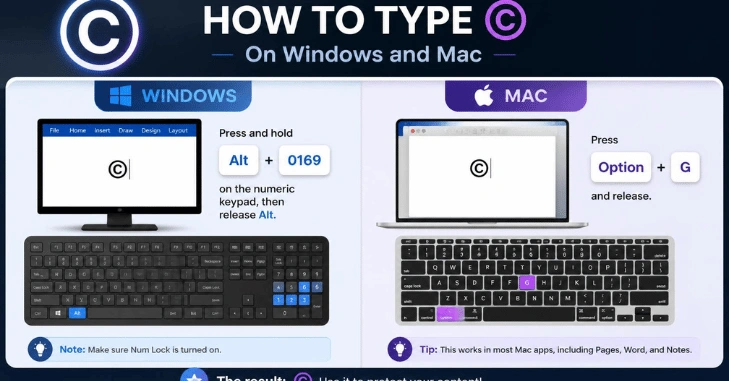
The quickest input method depends on your device and keyboard.
Windows
Microsoft lists Alt + 0169 as the Windows Alt code for ©. Hold the Alt key and enter 0169 on the numeric keypad.
If your laptop has no numeric keypad, copying the character may be easier. You can also use Windows tools to access special characters.
Keyboard behavior can vary between devices. If you often work with startup keys and Windows shortcuts, Techixia’s guide to entering BIOS explains another set of keyboard commands worth keeping handy.
Mac
Apple provides the Character Viewer for inserting symbols and special characters on macOS. Open the viewer, search for “copyright,” and then select © to insert it.
The Character Viewer is useful when you do not remember a shortcut, as it lets you search visually rather than memorizing character codes.
iPhone, iPad, and Android
Mobile keyboard layouts differ by device, language, and keyboard app. The most reliable method is to copy the © symbol from a trusted source and paste it where needed. If you use the character frequently, keep it in a note or create a text-replacement entry for quick access.
HTML and Unicode Codes for the © Mark
Web developers have several ways to display the character.
| Format | Code |
| Unicode | U+00A9 |
| HTML named reference | © |
| HTML decimal | © |
| HTML hexadecimal | © |
| Literal UTF-8 character | © |
MDN documents © as the named HTML character reference for the copyright symbol. It also explains decimal and hexadecimal numeric character references.
Modern HTML does not require you to replace every ordinary Unicode character with an entity. MDN’s own HTML style guidance recommends using the literal character where practical rather than adding unnecessary references.
For example:
<footer>© 2026 Example Company. All rights reserved. </footer>
or:
<footer>© 2026 Example Company. All rights reserved. </footer>
Both can produce the visible © character on a correctly configured page.
Developers who like keeping common commands at hand may also find Techixia’s SQL cheat sheet a useful quick reference.
How to Write a Copyright Notice Correctly

A basic U.S. notice for visually perceptible works contains three main elements:
- The © mark, the word “Copyright,” or the abbreviation “Copr.”
- The year of first publication
- The name of the copyright owner
The U.S. Copyright Office lists these elements in its copyright guidance.
A simple notice might look like this:
© 2026 Techixia. All Rights Reserved
Techixia’s current site footer already uses a similar form, “© 2026 Techixia All Rights Reserved,” on every page.
The phrase “All rights reserved” is common, but it is not one of the three basic notice elements identified by the U.S. Copyright Office.
For a particular published work, the publication year matters. A site-wide footer may be managed differently as pages are added and updated, so publishers should keep their dates accurate.
If you are building a new business website, Techixia’s affordable website design guide covers several other practical aspects of planning and maintaining a site.
Do You Have to Use © for Copyright Protection?
In the United States, a notice is generally optional for works published on or after March 1, 1989. The U.S. Copyright Office also says that notice is optional for unpublished works and certain other categories.
That does not make the notice pointless.
The Copyright Office notes that a notice can tell the public that copyright is claimed. It can also identify the owner and the publication year. In some infringement disputes, a proper notice can affect an alleged infringer’s ability to argue innocent infringement.
Copyright law differs across jurisdictions, so a website serving users in several countries should not treat a footer notice as a substitute for legal advice.
© vs. ™ vs. ® vs. ℗
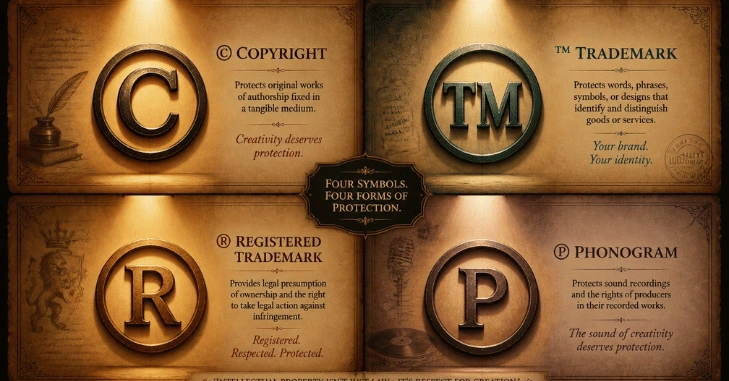
These marks look related, but they serve different purposes.
| Mark | Name | Common purpose |
| © | Copyright sign | Identifies a copyright claim in a work |
| ™ | Trademark symbol | Signals a claimed trademark |
| ® | Registered trademark symbol | Identifies a federally registered trademark in the U.S. |
| ℗ | Sound recording copyright sign | Used for copyright notices relating to sound recordings |
The USPTO says TM may be used to indicate a trademark claim even without a federal application. The ® mark is different. In the United States, it is used for trademarks registered with the USPTO and for the goods or services covered by that registration.
The ℗ character applies specifically to sound recordings rather than serving as another version of ©. Unicode lists it separately from U+00A9. That distinction matters. Do not replace one mark with another merely because the characters appear similar.
Common Mistakes to Avoid
A few small errors can make a notice confusing.
- Do not assume that adding © creates copyright protection.
- Do not use ® for a mark that lacks the required registration.
- Do not confuse © with ℗ when labeling a sound recording.
- Check the owner’s name and publication year before publishing.
- Avoid using (c) when you can insert the proper © character.
- Make sure your website uses an encoding that displays Unicode correctly.
For more practical guides on software, hardware, and digital topics, browse Techixia’s Technology section.
Keep the © Character Handy

For the fastest option, bookmark this page or save © somewhere you can easily copy it whenever needed.Writers can paste it directly; Windows users can press Alt + 0169; and Mac users can open the Character Viewer. Developers can use the literal character or an HTML reference. For a formal notice, pair it with an accurate year and the copyright owner’s name.
Conclusion
The copyright symbol © is a simple but important mark used to identify copyright-protected creative works. It commonly appears with the copyright owner’s name and the year of publication, helping readers understand who claims copyright in a work.
Although displaying the symbol can communicate ownership clearly, copyright protection generally does not depend solely on using the symbol. Understanding when and how to use the copyright symbol can help creators, businesses, writers, photographers, and website owners present their work more professionally and protect their rights.
Frequently Asked Questions
On Windows, Microsoft lists Alt + 0169 as the key combination for the © character. The method normally relies on numeric-keypad input.
The named HTML character reference is ©. You can also use © as a decimal numeric reference or © as a hexadecimal reference.
Not necessarily. Under current U.S. Copyright Office guidance, notice is optional for works published on or after March 1, 1989. It can still provide useful public notice and legal benefits.
Yes. You can use a footer notice such as © 2026 Example Company. For formal notice purposes, the U.S. Copyright Office identifies the year of first publication as one of the standard elements.
No. © relates to copyright. ™ signals a trademark claim, while ® has a specific registered-trademark meaning in the United States.