Press the power button, and nothing on your screen belongs to Windows, Android, or iOS yet. Something smaller must find the operating system, check it, and hand over control. That code stays invisible until the day it stops working.
Short answer: what is a bootloader? It’s the small program that runs after your device’s firmware and before the operating system kernel. It finds the kernel, checks that nobody tampered with it, copies it into memory, then hands over control. Windows, Linux, Android, and Apple hardware each use a different one.
Bootloader at a glance
| Question | Answer |
| What is a bootloader? | A small program that loads and starts the operating system kernel. |
| When it runs | After the firmware finishes, before the kernel starts. |
| Where it lives | On a reserved partition of your drive or phone storage, not in the OS. |
| What it hands off to | The kernel, which then starts drivers, services and your login screen. |
| Names you’ll see | Windows Boot Manager, winload, GRUB, ABL, iBoot. |
| Why phones lock it | A locked loader is the anchor of verified boot, so only signed code runs. |
| Typical run time | Under two seconds on modern hardware. |
Key takeaways
- Firmware wakes the hardware. The loader wakes the operating system. They are two separate stages.
- You already own four of them: one on your PC, one on your phone, one on your router, one in your car’s infotainment unit.
- Verified boot works as a chain: each stage checks the signature of the next before running it.
- Unlocking an Android phone wipes it, breaks Play Integrity for banking apps, and usually ends clean over-the-air updates.
- A damaged loader looks like a black screen with a short error line, not like a dead machine.
So, what is a bootloader responsible for, and what isn’t it?
People blur three things together: firmware, boot manager, and loader. They are separate, and the difference matters the moment something breaks. Firmware is burned into a chip on the motherboard. UEFI replaced the old BIOS design on almost every machine sold in the last decade, and its job ends once it knows which boot entry to run. It never touches your kernel.
A boot manager chooses. A loader loads. On Windows, the two are split across separate files, which is why a dual-boot menu can appear perfectly while the system behind one of the entries refuses to start.
The loader is also the last stage that can still be repaired from outside the operating system. Recovery tools, rescue USB sticks, and fastboot all work at this level, because the kernel is not running yet and nothing is holding the disk.
The boot chain, from power button to desktop
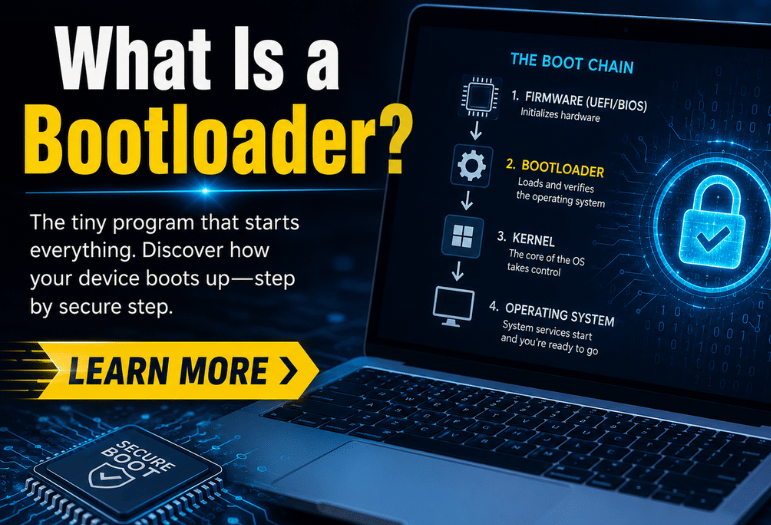
Startup is a relay race. Each runner does one job, checks the next runner, and hands over the baton. Here is the order on a modern PC or phone.
- Power on. The processor starts executing a fixed address in read-only memory. Nothing on your drive has been touched yet.
- Firmware, usually UEFI. It brings memory, storage, and the display, runs its self-test, and reads which boot entries exist.
- Boot manager. This picks which operating system or recovery entry to start. On a single-OS machine, it picks silently.
- The loader itself. It reads the kernel and its configuration off disk, verifies the signature, and decompresses it into memory.
- Kernel. The kernel takes over the hardware, mounts the root filesystem, and starts the first user-space process.
- Operating system. Services start, the graphical shell appears, and you get a login screen.
Everything above stage two happens before any antivirus or system service exists. That is exactly why a failure here looks so alarming, and why a machine that never reaches stage two has a hardware problem instead. If yours dies before the manufacturer logo, our guide to what to try when a computer won’t turn on at all covers the power and POST side of it.
The bootloaders you’ll meet
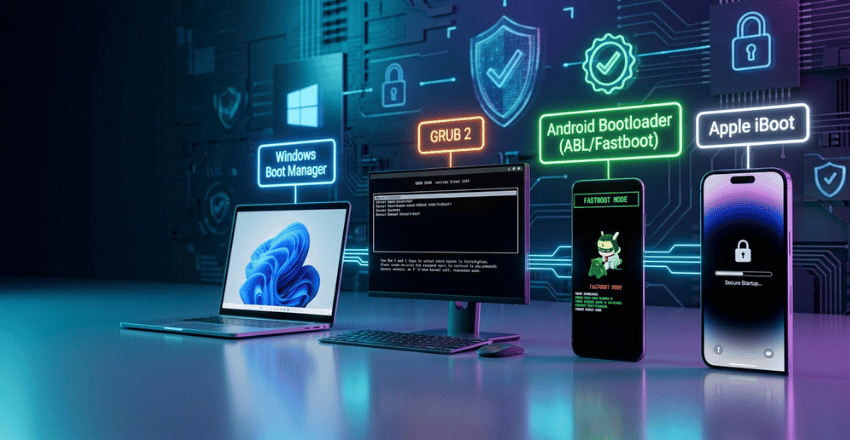
Four families cover almost every device in a US household.
| Platform | What runs | Chosen by | User-unlockable? | What guards it |
| Windows 11 | Windows Boot Manager, then winload.efi | Microsoft | No | UEFI Secure Boot signatures. |
| Linux desktop | GRUB 2, usually behind a signed shim | Your distribution | Yes, it’s yours already | Shim plus distro signing keys. |
| Android phone | Vendor loader, often ABL, plus fastboot | Phone maker | Sometimes, model by model | Android Verified Boot. |
| iPhone and iPad | Boot ROM, then iBoot | Apple | No | Apple Root CA and the Secure Enclave. |
On Windows, the boot manager reads its entries from the Boot Configuration Data store and then calls winload.efi, which is the file that actually pulls the kernel in. Linux users get GRUB 2, the menu with the countdown timer, normally loaded through a small, signed shim so Secure Boot stays satisfied.
Android splits the work across vendor stages ending in the applications loader, which also exposes fastboot mode. Even a folding flagship follows that pattern, as our Galaxy Z Fold5 buying breakdown shows on the software support question.
Apple runs the tightest chain of the four. An immutable Boot ROM holds the Apple Root CA public key and verifies that iBoot is signed by Apple. iBoot then verifies and runs the kernel, while the Secure Enclave separately checks its own sepOS.
Verified boot and the chain of trust
Each stage verifies the next one’s cryptographic signature before running it. Google describes Android Verified Boot as “a full chain of trust, starting from a hardware-protected root of trust to the bootloader, to the boot partition and other verified partitions”. Break any link, and the chain stops.
Malware that lands at this level is called a bootkit, and it loads before your security software gets a turn. That’s the gap verified boot closes, and it’s also why the antivirus tools we rate highest increasingly report on firmware and boot integrity rather than files alone.
Android also shows you the result. A locked phone with the maker’s own keys boots green and silent. Swap in your own signing keys, and it boots yellow instead. An unlocked phone shows an orange screen for about ten seconds, saying software integrity cannot be guaranteed. Red means verification failed, or that no OS was found at all.
Unlocking an Android bootloader: what you get, and the bill
This is where most explainers wave vaguely at “risks” and move on. Here is the concrete version.
What unlocking genuinely gets you
- Install a custom ROM, which is the realistic way to keep a phone patched after the maker drops it.
- Root access, and with it full backups, ad blocking at the system level, and firewall control.
- Remove preinstalled carrier software that the normal uninstall screen won’t touch.
- Flash a stock factory image yourself when an update leaves the phone stuck.
What it costs you
- Everything is on the phone. Android requires a factory data reset during the process, so photos, messages, app data and saved logins go. That is deliberate: an unlocked device can be read by anyone holding it.
- Banking and payment apps. Google’s Play Integrity API grants MEETS_DEVICE_INTEGRITY only where there is hardware-backed proof that the loader is locked, and the OS is a certified manufacturer image.
- Rooted or unlocked phones return an empty verdict, so banks, wallets, and some streaming and game apps refuse to run. You can see which apps are involved by auditing the hidden Google Play Store settings before you commit.
- Warranty and vendor features. Samsung trips a hardware fuse called Knox on first unlock. It never resets, and Secure Folder plus Samsung Wallet stay dead afterward even if you relock the phone.
- Clean over-the-air updates. Once partitions are modified, incremental OTA patches fail or loop, and you end up flashing full images by hand every month.
- The daily warning screen. That orange notice appears on every single boot, and there is no supported way to hide it.
- Sometimes the option isn’t there. Many US carrier models ship with the OEM unlocking toggle permanently grayed out, so the answer is simply no.
None of that makes unlocking wrong. It makes it a trade you should price before you start, not after your bank app stops opening.
What a corrupted bootloader looks like
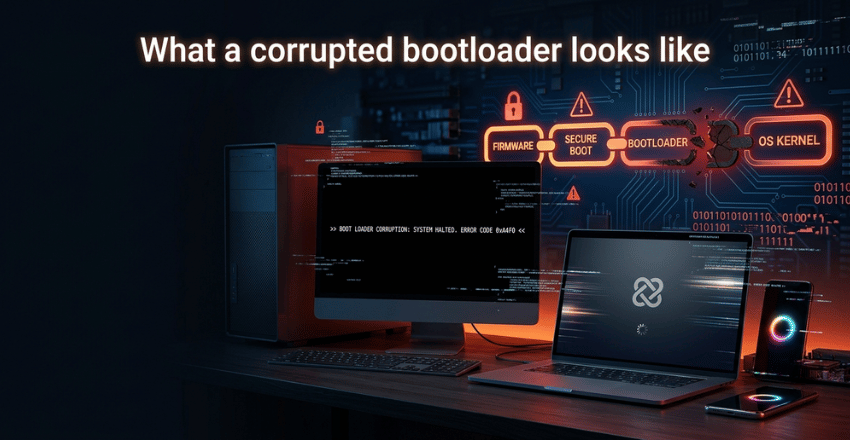
Not like a dead computer. The fans spin, the keyboard lights come on, and the maker logo appears. Then the screen goes black with one terse line. You might see an operating system wasn’t found, BOOTMGR is missing, or error: no such partition with a GRUB rescue prompt. On the phone, the logo cycles forever.
The tell is that the machine is clearly alive and clearly not loading anything. Causes are dull: a failed update, a power cut mid-write, a dying SSD, a cloning job that copied the partition but not the boot entry.
Recovery media rebuilds the boot files in most cases without touching your documents. A blank USB drive big enough to hold that media costs around $10, which is the whole repair budget. Want a second opinion before you act? We keep a list of trusted tech review sites worth cross-checking.
Frequently asked questions
It’s the program that starts your operating system. Firmware wakes the hardware; this stage wakes the OS, and then it steps aside.
No. UEFI is firmware living on a motherboard chip. The loader is software sitting on your drive. UEFI hands over to it and stops.
In the United States, yes, unlocking your own device’s boot chain is legal. Legality isn’t an issue. The wiped data, the failed integrity checks, and the voided vendor features are.
Usually, and you should before you sell the phone. Relocking wipes it again, and it will not restore Samsung Knox features or reset that fuse.
Only to repair it, or to add a second operating system. Otherwise, the boot files should be left exactly where the installer puts them.